
Case Map: In One Day, the Client Sees Everything, and the Team Sees the Client's Actions in the App 👀🤝
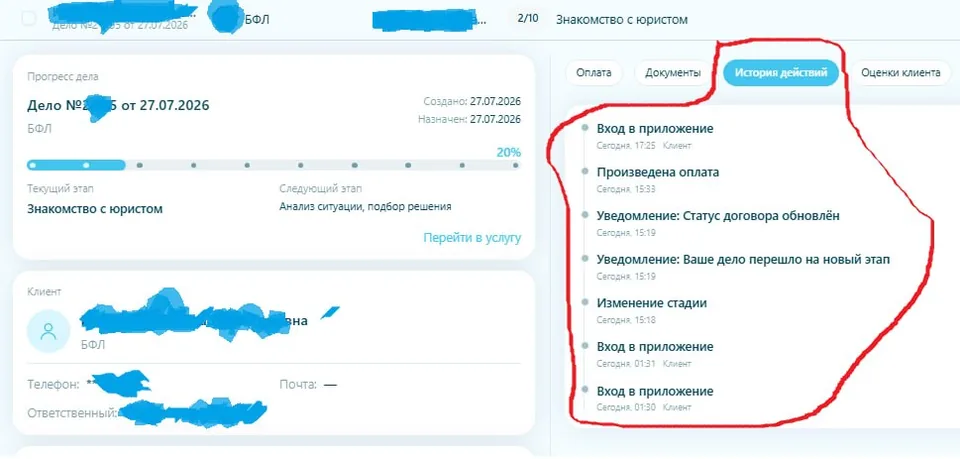
This Case Map example clearly shows how we link the legal company's work and client behavior in a single interface — all events happen within just one day.
1. The client sees the case progress for the day 📊
– The case is created with a date, status, and progress percentage.
– The current stage is "Meeting with the lawyer," the next is "Situation analysis, solution selection."
– In one day, the client manages to pay, receive notifications, and see that the case has moved to a new stage — everything is transparent and on one screen, without calls asking "what's up?"
2. The company employee sees all client actions in the app 🕒
On the right — the action history for one day: app logins, payment made, stage changes, notifications about a new stage and contract status update.
The employee in the web office sees the same activity feed: when the client logged in, paid, read a notification, and checked the status.
Previously, such moments often turned into calls to the office:
"I paid, did you see it?", "What's happening with my case now?" — this distracts the team and takes time.
Now:
– the client sees the answers to these questions in the app — they gain peace of mind and a sense of control
– the team has fewer routine calls and clarifications, lower support load, more time for actual case work
3. Transparency for the client and manageability for the team 👩💼
– The case card shows the responsible specialist and contacts, so the client knows who is handling their case.
– The team sees the same stages and the same action history as the client — one "reality map" instead of two parallel worlds of "CRM" and "where is my case?".
We continue to make the service honest for both sides:
the client sees the case progress and their actions during the day, and the employee sees the client's activity. Transparency gives the client peace of mind and reduces the team's workload.
If you want your clients to call less to "check in" and see more — write to us, we'll show you how Case Map can work in your company.
Comments
0No comments yet.
Sign in to join the discussion.